At Apigit, we understand that streamlining the lives of developers is essential. To this end, we have a growing list of integrations that are commonly used, and our custom webhooks let developers customize their workflow by triggering actions. This way, we make accessing the necessary data and automating their workflows simple and efficient.
What is a Custom Webhook?
Custom webhooks (also known as web callbacks) are used by applications to connect with other applications to get instant notifications about an update or an event that is being monitored. However, unlike regular API calls that pull data at regular intervals, webhooks allow you to get real-time updates.
Apigit Custom Webhooks
To create a webhooks for your repository, click the setting icon beside your repository.
️
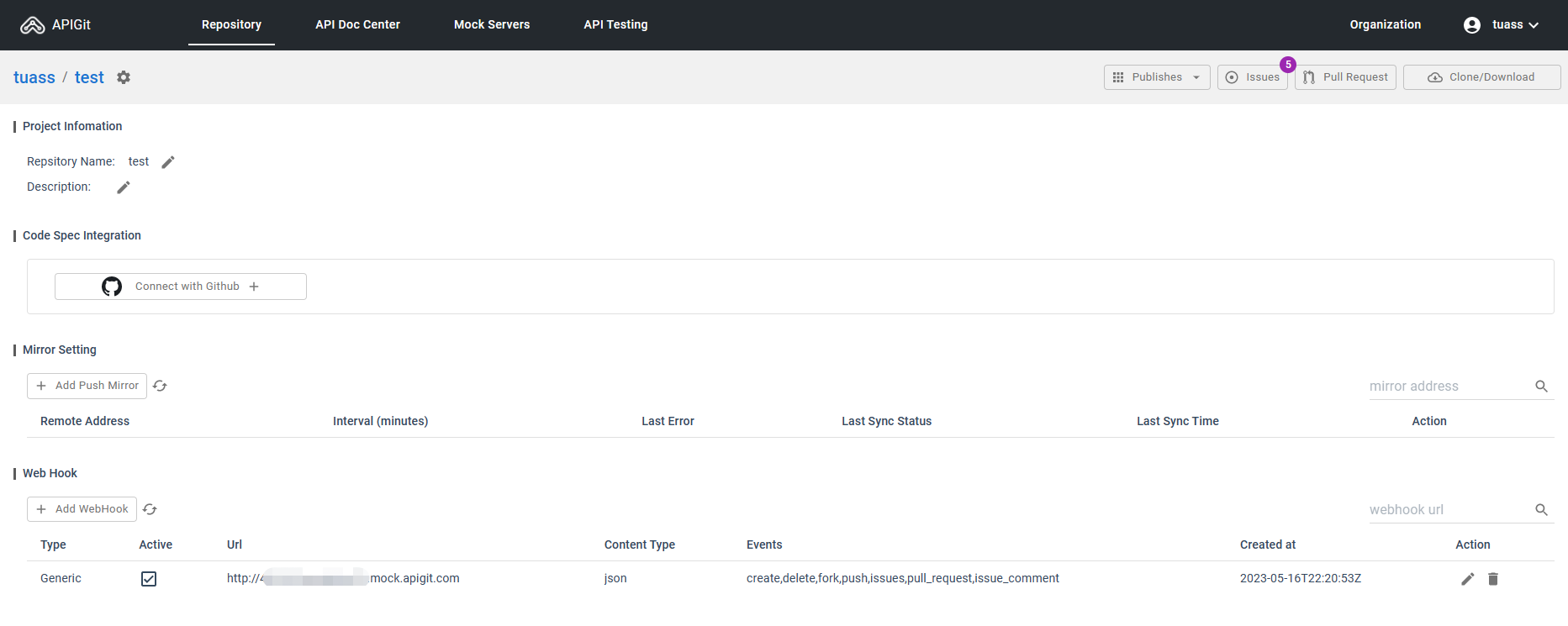
To understand how webhooks work, follow these steps:
- Publish a mock server using Apigit.
- Fill the
Web Hook URLfield with the URL of the mock server. - Monitor the mock server log for any changes made in your repository.
Here is the log when I try to post an issue.
Content-Type: application/json
host: service-432c52uwedzskn22
User-Agent: GogsServer
X-Amzn-Trace-Id: Root=1-646429f9-600198f81eac6574410074fe
X-Apigit-Delivery: 3fdcd42d-5bcb-45c5-b01a-27a2e5e23b00
X-Apigit-Event: issues
X-Apigit-Signature:
X-Forwarded-For: 54.203.224.187
X-Forwarded-Port: 80
X-Forwarded-Proto: http
X-Github-Delivery: 3fdcd42d-5bcb-45c5-b01a-27a2e5e23b00
X-Github-Event: issues
X-My-Request-Header: XXX

{
  "action": "opened",
  "number": 5,
  "issue": {
    "id": 126,
    "number": 5,
    "user": {
      "id": 1346,
      "username": "xxxx",
      "login": "xxxx",
      "full_name": "",
      "email": "xx@xx.com",
      "avatar_url": "https://secure.gravatar.com/avatar/xx?d=identicon",
      "is_invite_pending": false
    },
    "title": "5",
    "body": "5",
    "labels": [],
    "milestone": null,
    "assignee": null,
    "state": "open",
    "comments": 0,
    "created_at": "0001-01-01T00:00:00Z",
    "updated_at": "0001-01-01T00:00:00Z",
    "pull_request": null
  },
  "repository": {
    "id": 1210,
    "owner": {
      "id": 1346,
      "username": "tuass",
      "login": "tuass",
      "full_name": "",
      "email": "xx@xx.com",
      "avatar_url": "https://secure.gravatar.com/avatar/xx?d=identicon",
      "is_invite_pending": false
    },
    "name": "test",
    "full_name": "xx/test",
    "description": "",
    "private": true,
    "unlisted": false,
    "fork": false,
    "parent": null,
    "empty": false,
    "mirror": false,
    "size": 876544,
    "html_url": "https://app.apigit.com/repository/xxxx/test",
    "ssh_url": "git@app.apigit.com:xxxx/test.git",
    "clone_url": "https://app.apigit.com/xxxx/test.git",
    "remote_addr": "",
    "website": "",
    "stars_count": 0,
    "forks_count": 0,
    "watchers_count": 1,
    "open_issues_count": 0,
    "default_branch": "master",
    "created_unix": "2023-04-29T03:36:18Z",
    "updated_unix": "2023-05-16T22:23:21Z",
    "status": 0
  },
  "sender": {
    "id": 1346,
    "username": "xxxx",
    "login": "xxxx",
    "full_name": "",
    "email": "xx@xx.com",
    "avatar_url": "https://secure.gravatar.com/avatar/xx?d=identicon",
    "is_invite_pending": false
  }
}
Related Posts
API Repository
APIs have become a vital part of modern software and business infrastructure, enabling organizations to expand the capabilities of software and improve integration with external services. The process of API development involves several stages, including planning, designing, developing, testing, deploying, and maintaining APIs. The API producer is responsible for creating and managing the API, while the API consumer utilizes the API to build applications or integrate with existing software. Apigit's API Platform is designed to help organizations navigate the API development and management process more effectively, with native Git support and streamlined collaboration. By leveraging Apigit's capabilities, businesses can improve operational efficiency, integration with external services, and stay competitive in the rapidly evolving digital landscape.
Upstream Push Mirrors
Push mirrors are often used in distributed development environments where multiple teams or individuals work on the same codebase across different locations. They allow for redundancy, collaboration, and backup purposes. By using push mirrors, everyone can work on their local repositories and push their changes to a central mirror repository, ensuring that the changes are distributed to other team members or locations.
Two-Way Sync with Other Git Providers
Two-way synchronization with Git providers ensures that changes made in either APIGit or your preferred Git repository are automatically updated in both systems, maintaining consistency across development environments.
Ready to get started with APIGIT?
Join thousands of developers and teams who are already using APIGIT to streamline their API development workflow.