APIGit is a cutting-edge collaboration platform that leverages the power of Git technology to make API development and collaboration seamless. With its flexible options, it offers a wide range of customization to fit your specific needs.
- standalone
In standalone mode, API repositories are hosted solely on APIGit and treated as the single source of truth. All commits made through the web portal or local Git clients are automatically directed to APIGit's global, highly-available servers. This option offers the simplest setup, with all the data and history stored within the APIGit platform.

- standalone + one-way synchronization
Standalone with one-way synchronization takes things a step further by allowing you to configure multiple "push mirrors" to sync your API repositories with external Git servers of your choice. This way, you can keep a copy of your repositories on APIGit as the authoritative source, while also keeping them updated on popular Git platforms like Github, Bitbucket, Azure DevOps, AWS CodeCommit, Gitee, or even your own self-hosted Git server with public access. Push mirrors are available on the Enterprise plan.

- two-way synchronization
For those who already have their API repositories hosted on an external Git server, APIGit offers a two-way synchronization option. This allows you to keep your API repositories on your designated external server as the single source of truth, while APIGit provides a smart two-way synchronization to ensure that all commits made on APIGit are automatically reflected on the external server and vice versa. This option offers the most control and integration with your existing Git infrastructure, and it is available on the Enterprise plan. Pull requests and branch protection rules are then managed through your Git provider.

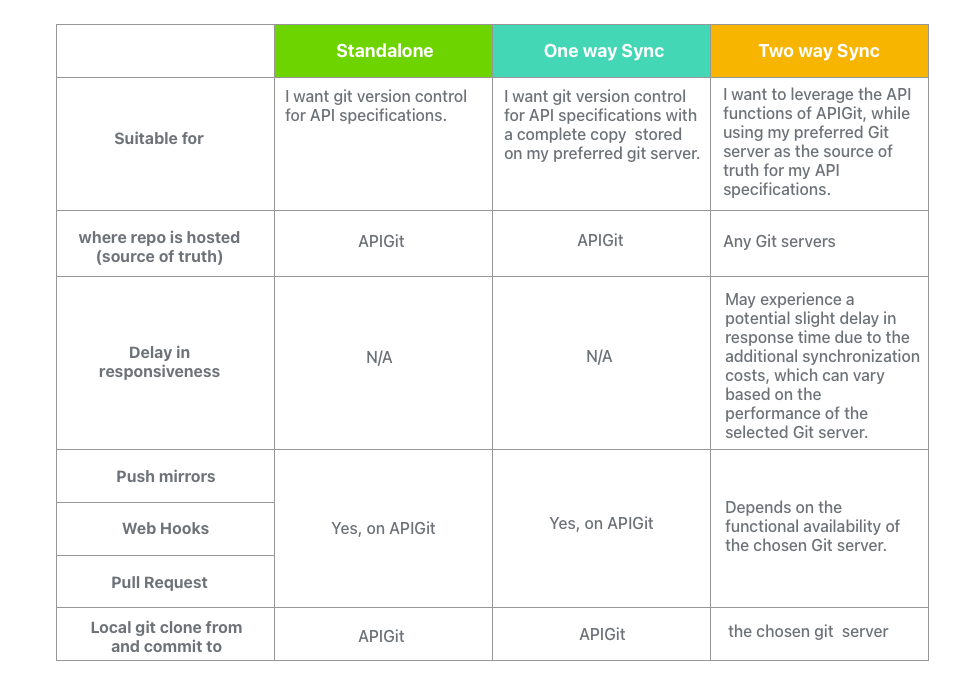
In conclusion, APIGit provides you with the flexibility and choice to determine the best option for your business needs. Whether you need a standalone solution, one-way synchronization, or two-way synchronization, APIGit has got you covered with its comprehensive set of features and options. The most suitable mode for you will depend on your unique requirements and working process. To assist you in making an informed decision, here's a comparison of the three modes.
Related Posts
Edit Many Files, Commit Once
Edits in APIGit now stay as drafts across files. Review them together, choose what goes in, and commit them as one commit, with conflicts resolved line by line.
Pull Request Upgrades in APIGit
Commit events in the timeline, a file tree for the diff, update branch, a merge style dropdown and checks that recover from temporary failures.
SSH Access, Deploy Keys and Repository Tokens
Clone and push over SSH at git.apigit.com, give a server access to one repository with a deploy key, and use personal access tokens limited to repositories.
Ready to get started with APIGit?
Create a free workspace, add an OpenAPI file and publish your first API document and mock server in minutes.