Enterprise accounts can let their people sign in to APIGit with their company's identity provider. APIGit single sign-on uses OpenID Connect (OIDC), and every connection is tied to an email domain that you prove you own.
Connect your identity provider
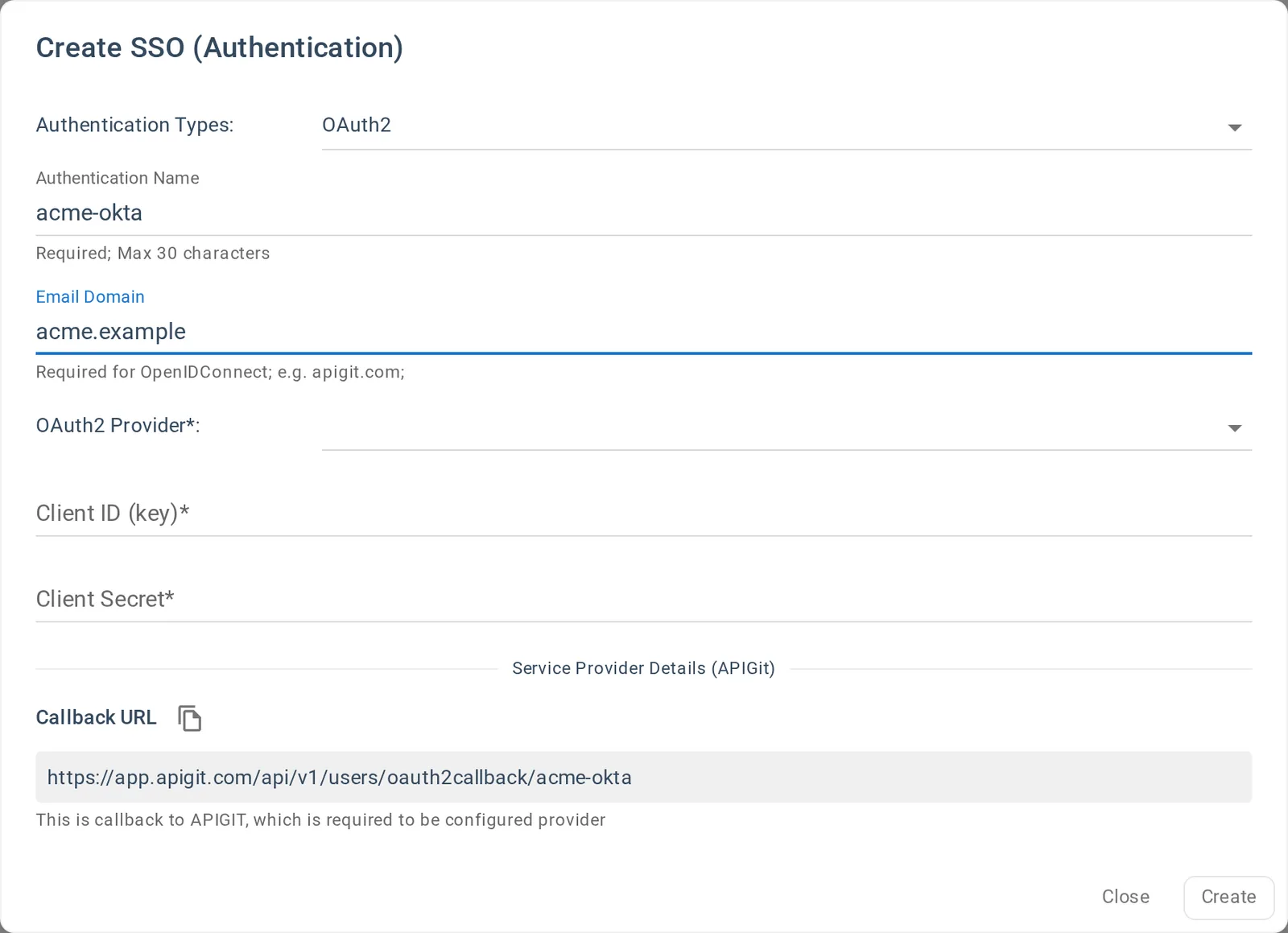
The account owner and account admins can set up SSO. Open Billing & Plan, go to SSO Integration (optional) and click Add SSO Integration. You give the integration a name and your email domain, choose openidConnect as the provider, and enter the client ID and secret from your identity provider, along with its OpenID Connect auto discovery URL, which must start with https://.
The dialog shows the callback URL to copy into the application at your provider, built from the name you chose:
https://app.apigit.com/api/v1/users/oauth2callback/<name>
Prove the domain with a DNS record
A new integration starts as Pending, and it cannot be used yet. APIGit shows a TXT record with the value apigit-verify=<token>. Add it to the DNS of the domain itself, then click Verify. If the record is not found yet, APIGit says so and you can try again later, because DNS changes can take a while.
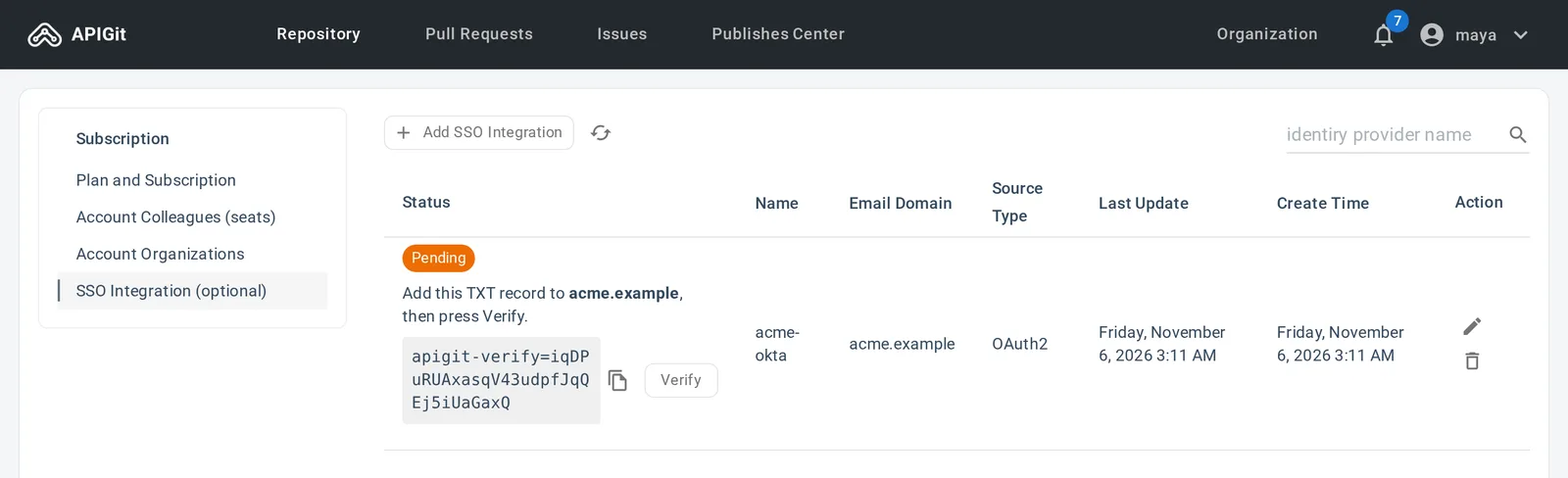
Public mail domains, such as gmail.com, are refused. The first account to verify a domain gets it.
This step matters because an identity provider can assert any address it likes. Verifying the domain means only the company that controls a domain can connect a provider for it.
Activation
A verified integration is not active yet, and you cannot activate it yourself. Email support@apigit.com with the integration name, and the APIGit team activates it.
What happens at sign-in
People click Sign in with SSO on the sign-in page, enter their work email address, and sign in at your identity provider. Each integration is confined to its own domain:
- An address in any other domain is refused, even if your identity provider returned it.
- An existing password account with the same address is not linked automatically.
Keeping it safe to edit
When you edit an integration, leave Client Secret blank to keep the current secret, so you can change other settings without having it to hand. The name and the email domain cannot be changed after creation.
SAML
APIGit does not support SAML. If your identity provider offers both, use its OIDC application type.
Before you start
You need:
- An Enterprise plan
- The account owner or account admin role on APIGit
- Access to create an OIDC application at your identity provider
- Access to your domain's DNS
See Single Sign-On for the setup, step by step.
Related Posts
Announcing APIGit Enterprise with Single Sign-On (SSO)
SSO stands for Single Sign-On. It is an authentication mechanism that allows users to log in once and access multiple applications or systems without having to re-enter their credentials for each one. With SSO, users can authenticate themselves to a central identity provider, which then grants them access to various services or applications. This simplifies the user experience, improves security, and reduces the need for multiple usernames and passwords.
Team Collaboration and Role-Based Access Control
APIGit supports flexible team collaborations and Role based access control
Team Collaboration in APIGit
APIGit enhances team collaboration through role-based access control, workflow management, change tracking, and integrated feedback systems that streamline API development processes.
Ready to get started with APIGIT?
Join thousands of developers and teams who are already using APIGIT to streamline their API development workflow.