Pin or Follow a Branch: Mock Servers and Published Documents
Publishing from Git means every mock server and every published document points at one commit. The question is how that commit changes. Both now offer the same two answers: pin it, or follow a branch. And because several can come from one commit, you can use both at once.
Pin or follow
| | Pin to commit | Follow branch |
|---|---|---|
| Serves | The commit it was published from | The head of the branch |
| Updates | When you publish it again | Automatically, at every update of the branch |
| Good for | A released version, a partner sandbox | A development or next version |
| Plans | Every plan | Team and Enterprise |
Pinning is the default. To follow, publish from a branch and choose Follow branch under Update Strategy. A publish from a commit in the history is always pinned. You can change your mind later on the mock's or the version's page.

"Every update" means a push, a merged pull request, a file saved in the APIGit editor, or a pull-mirror sync. The URL, the access settings and, for a code-based mock, the state stay the same, so clients never need to change anything.
A failed update never takes a mock down
If a new commit cannot be published, for example because a served document was deleted or is invalid, the mock keeps serving its last good commit. Its page shows the reason and the commit that failed, and the next update of the branch tries again. If the branch is deleted, or the publisher's account moves to the Free plan, a mock or a document stays on its last commit and stops updating.
Several document versions at one commit
A published document is a version name pointing at a commit, so publishing builds nothing and shows exactly what was committed. Versions are identified by name, so any number of them can point at one commit, each with its own URL, access rules and shared links.
A common setup is 2.1 pinned to your stable release for partners, and next following main for your own team.
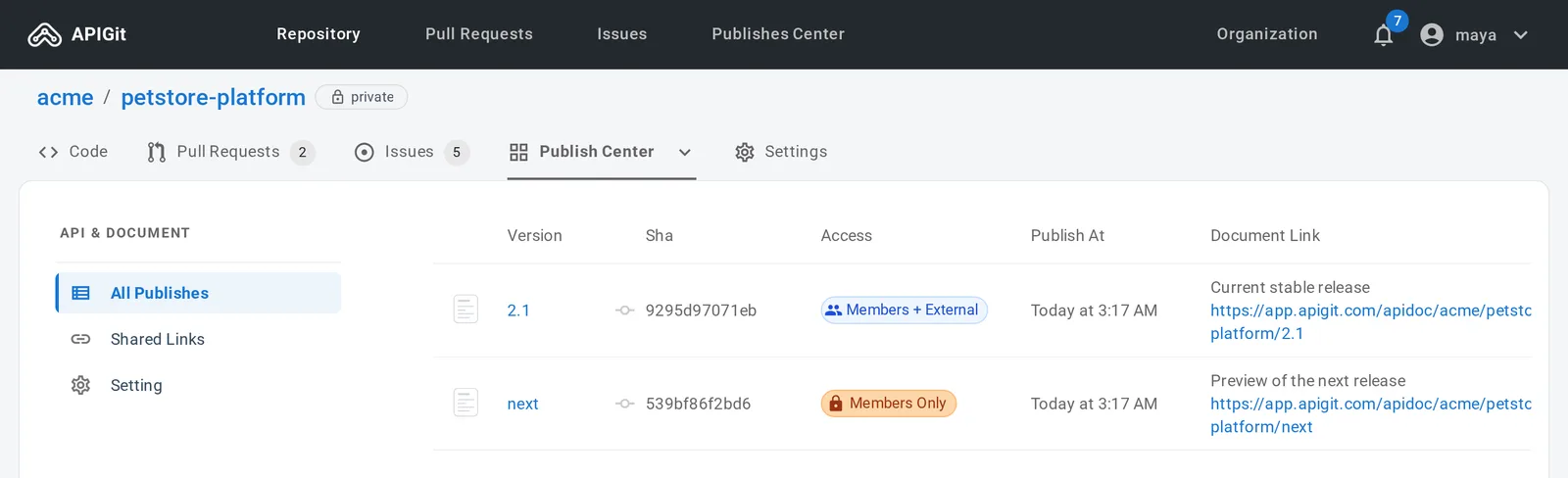
A following version moves within seconds of an update. If an update is ever missed, it catches up within about 10 minutes.
One caution: a following version shows the branch as it is, and nothing is checked first. Follow a branch that only takes reviewed changes, and use branch protection if readers outside your team can see the version.
Several mock servers, too
Mock servers work the same way. They are identified by name, so any number of them, of either type, can come from one repository and even from one commit. Keep a pinned mock of your last release for partners, next to one that follows main for your frontend team.
Read more in Pin or follow a branch and Publish an API Document.
Related Posts
Spec-Based Mock Servers: A Working Mock from Your OpenAPI Document
Publish a mock server from your OpenAPI documents without writing code. It validates requests, answers from your examples and schemas, and works on every plan.
Spec-Based or Code-Based: Which Mock Server Do You Need?
APIGit has two types of mock server. Here is how they differ, when each one fits, and how to run both from one repository.
Mock Servers That Tell You What Is Wrong
Spec-based mock servers validate each request against your OpenAPI document, return clear problem+json errors, and let clients pick a response with the Prefer header.
Ready to get started with APIGIT?
Join thousands of developers and teams who are already using APIGIT to streamline their API development workflow.