Spec-Based Mock Servers: A Working Mock from Your OpenAPI Document
Until now, a mock server on APIGit meant writing scripts. Today there is a second way, and it is the new default: a spec-based mock server answers from your OpenAPI documents, and you write no code. It works on every plan, Free included.
What it does
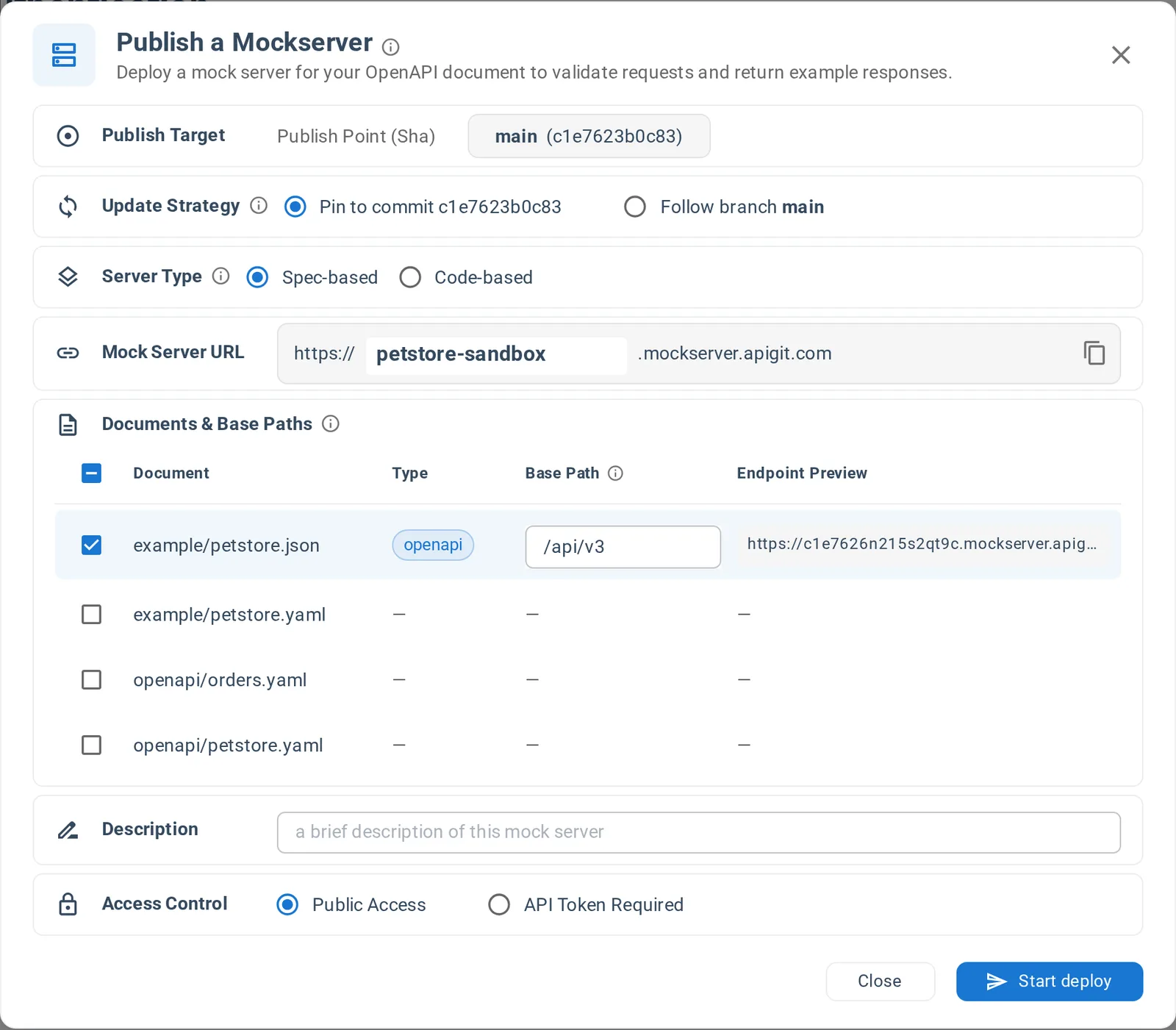
A spec-based mock takes one commit of your repository and serves the documents you choose at a URL of its own, such as https://petstore-sandbox.mockserver.apigit.com. For each request it finds the matching operation, checks the request against the document, and answers from the document: its examples first, or a body generated from the schemas.
The document is the mock, so the two cannot drift apart.
Publish one
Open your repository, click Publish and choose Publish MockServer. Spec-based is already selected. Check the documents to serve, and click Start deploy. Every new repository includes an example at example/petstore.json, so you can try it straight away.
Then call it:
curl https://petstore-sandbox.mockserver.apigit.com/api/v3/pet/1 \
  -H 'api_key: anything'
The body comes from the document. Because Petstore declares an api_key scheme for this operation, the mock asks for that header, but it only checks that the header is there.
Several APIs on one mock
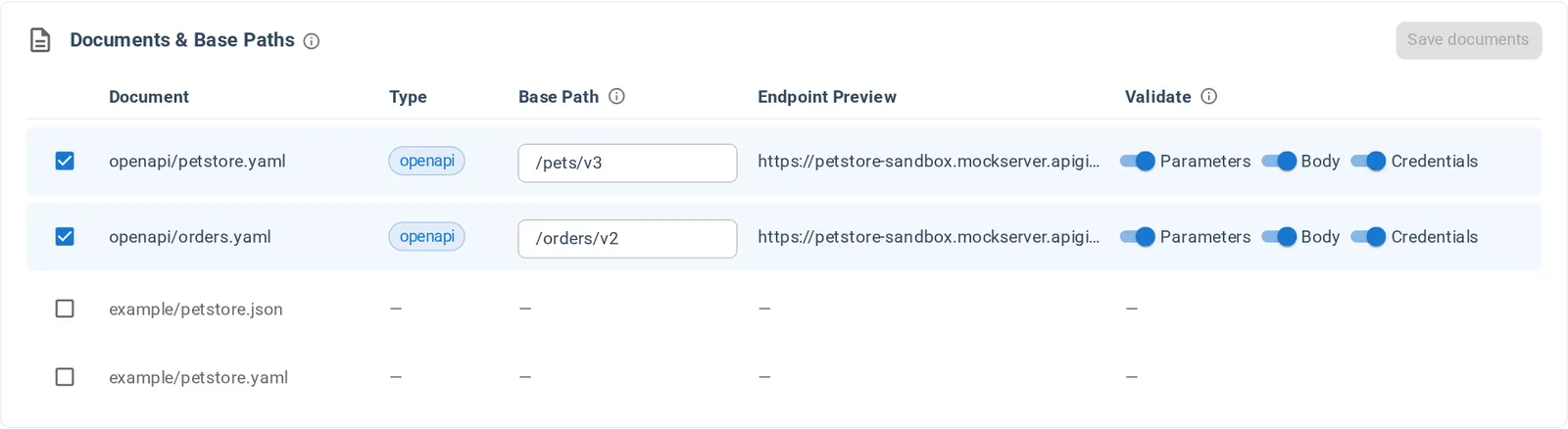
Each document is mounted under a base path, so several APIs can share a mock server without their routes colliding:
https://storefront-sandbox.mockserver.apigit.com
├── /pets/v3    openapi/petstore.yaml
└── /orders/v2  openapi/orders.yaml
The default base path comes from the document's first servers URL, and you can set any other. You can add documents, remove them and change base paths later on the mock's Setting page, without a republish. The Free plan serves one document per mock, Team and Enterprise serve ten.
What it reads
- OpenAPI 3.0.x and 3.1.x, in YAML or JSON
- Swagger 2.0, converted automatically
- Split documents: the local files a document references with
$refare collected with it, including files in other folders
A remote $ref is refused at publish, because the mock fetches nothing from the internet. Inline those definitions or keep them in the repository.
Ask for the response you need
Use the Prefer header to pick a declared status with Prefer: code=404, a named example with Prefer: example=sold, or random realistic data with Prefer: dynamic=true. To see what a mock serves, call GET /apigit-mockserver-routes, and to see what it received, open its Logs.
A spec-based mock keeps no state between requests. If a response must depend on earlier requests, that is the job of a code-based mock server.
Next steps
- Quick start: publish your first mock server and call it
- Documents and base paths: how a request finds its document
- Responses: how a mock chooses what to answer
Related Posts
Spec-Based or Code-Based: Which Mock Server Do You Need?
APIGit has two types of mock server. Here is how they differ, when each one fits, and how to run both from one repository.
Mock Servers That Tell You What Is Wrong
Spec-based mock servers validate each request against your OpenAPI document, return clear problem+json errors, and let clients pick a response with the Prefer header.
Pin or Follow a Branch: Mock Servers and Published Documents
Keep a mock server or a document on one commit, or let it follow a branch. Run several versions from one commit, such as a pinned 2.1 next to a following next.
Ready to get started with APIGIT?
Join thousands of developers and teams who are already using APIGIT to streamline their API development workflow.