More and more, the first reader of your API documentation is not a person. A developer asks Claude, Cursor or ChatGPT how to call your API, and the agent goes looking. If all it finds is a web page built for a browser, it guesses. APIGit now gives agents the same documents your readers see, in the formats agents read, and adds two more ways to work with APIGit without opening the application: an MCP server for your account and the apigit command line.
Published documents that answer agents
Nothing changes in how you publish. Every published version now also answers at these addresses:
| Output | What it is |
|---|---|
| llms.txt | An index of the version: its pages and one line per operation |
| Markdown pages | Each page, operation and schema as plain Markdown |
| Bundled OpenAPI file | One file per spec, with references to other files resolved |
| MCP server | A read-only endpoint with search, outline, operation and schema tools |
The same access rules apply. A public version is readable without a sign-in. A member-only version needs a token of someone who can open it. A share link is for people and is not served to agents.
Copy page, on every page
Readers get to all of this from one button. Copy page sits at the top right of every published page, next to the title of a Markdown page or of an API reference.
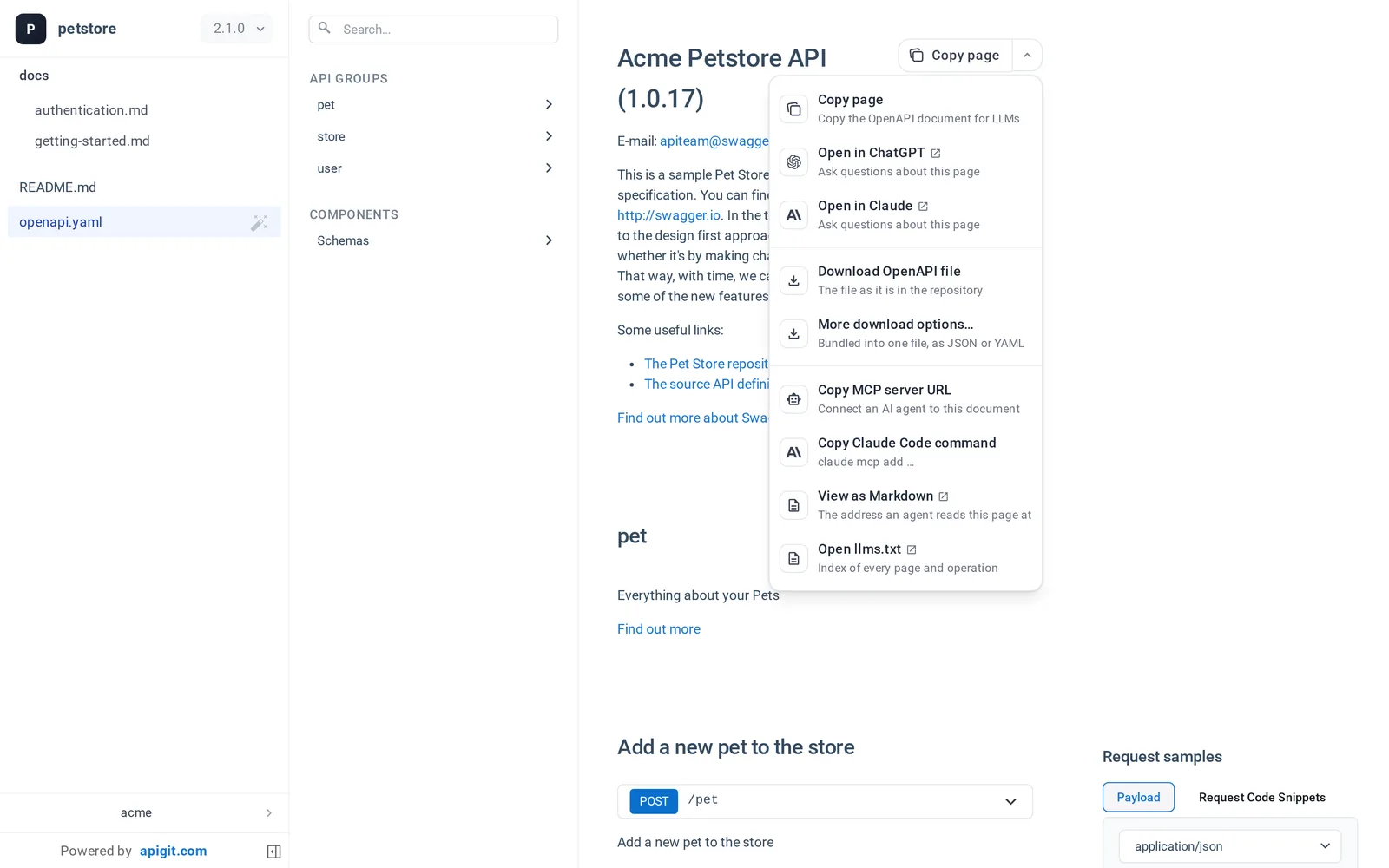
- Copy page copies the page as Markdown. On an API reference it copies the OpenAPI document with its references resolved.
- Open in ChatGPT and Open in Claude start a chat about the page. For a public document the chat application is given the page's Markdown address and reads it itself.
- Download OpenAPI file saves the file as it is in your repository.
- Copy MCP server URL and Copy Claude Code command connect an agent to the whole document.
You can turn agent access off for a repository with one switch, and the published document list shows how many requests agents made in the last 30 days.
An MCP server for your account
The published-document MCP server is for your readers. The APIGit MCP server is for you. It lets an agent work with what you can see in APIGit: repositories, OpenAPI files at any branch, tag or commit, what changed between two of them, pull requests, published documents, mock servers with their request logs, and your organization's governance rules.
A chat application signs in on a consent page that shows what it asks for:
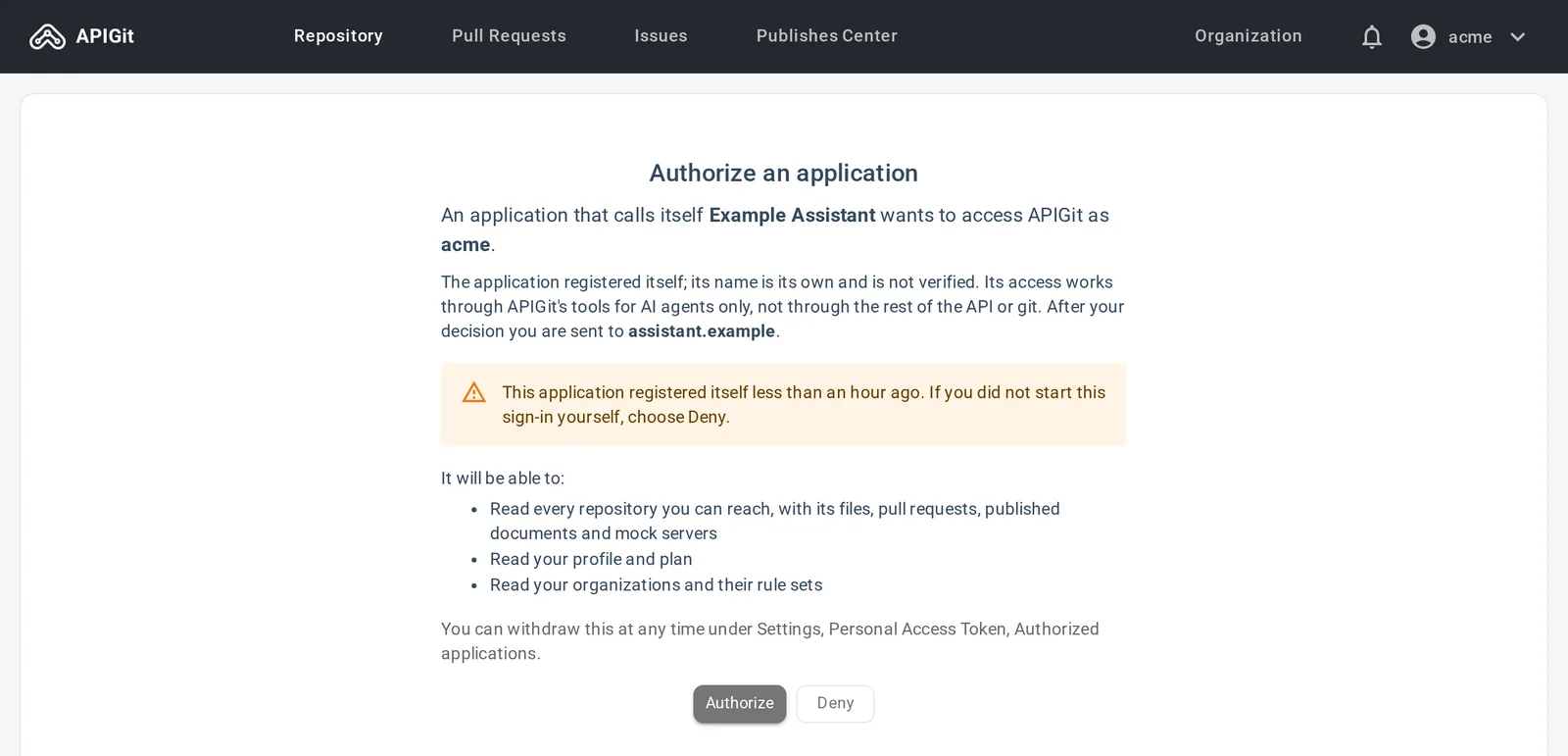
A coding agent in a terminal uses your CLI login instead, so no token is written to a configuration file:
apigit agent setup # Claude Code; or --client cursor, --client vscode
The connection is read-only unless you ask for more. With the write tools on, an agent can create a branch, commit or patch files, open a pull request, and publish or remove a document version or a mock server. It works the way a careful colleague would:
- It never commits to the default branch or a protected branch, and it cannot merge. You review the pull request.
- It can never make a document public or turn a mock server's access control off.
- Every call is checked like the same action in the application.
The apigit command line
The CLI brings APIGit's checks to where you write the spec. These commands need no account and work offline:
npm install -g @apigit/cli

apigit lint openapi.yaml                          # the same rule sets as the editor
apigit score openapi.yaml                         # how ready the description is for AI agents
apigit breaking origin/main HEAD openapi.yaml     # exit 1 on a change that can break a client
Sign in, and the same tool publishes from the repositories you keep on APIGit:
apigit auth login
apigit doc publish --version 1.2.0
apigit mock publish --name petstore --type spec --mount openapi.yaml
In CI, apigit lint --org my-org --report-status runs your organization's governance rule sets and posts the result as a commit status, which a branch protection rule can require before a merge. A GitHub Actions job can sign in without a stored secret: a repository admin names the GitHub repository once, and its jobs sign in with the identity token GitHub issues to them. That login lasts one hour and works on that one repository.
Where to start
- Open one of your published documents and try Copy page.
- Read Use a published API document with AI agents.
- Connect your agent: APIGit MCP server.
- Install the CLI: APIGit CLI.
Related Posts
Copy Your Docs to Your AI Assistant
Copy page, Open in ChatGPT and Open in Claude bring a published document to the assistant you already use. APIGit itself has no built-in AI, and here is what that means.
View API Documents in Different Modes
APIGit suports different viewer modes for an API documents. it is easy for you to switch viewers among of them
Navigation Customization for Published Documents
Navigation customization for published API documents allows organizations to create intuitive, branded experiences that enhance user engagement and streamline access to critical information.
Ready to get started with APIGIT?
Join thousands of developers and teams who are already using APIGIT to streamline their API development workflow.